
Overview: Owners vs. Assignees
Each task can include both an Owner and one or more Assignees, and they serve different purposes:
- Owner
The Owner is the primary person responsible for the task. This is typically the individual who will take action and ensure the task is completed.
- Only one Owner can be assigned per task
-
- Must be an individual user (not a team)
- Must be an individual user (not a team)
- Assignees
Assignees are additional users or teams who should be involved in or aware of the task. Depending on the workflow, they may contribute to the work or simply stay informed on the task’s progress
- Can include multiple users and/or teams
-
- Useful for collaboration, visibility, or oversight
- Useful for collaboration, visibility, or oversight
How to Assign or Remove Owners and Assignees
1. To assign Owners and Assignees, navigate to the appropriate task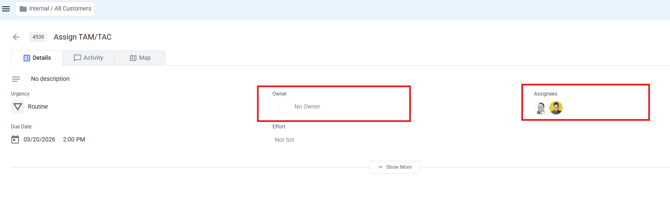
2. Hover over either field and click on it to assign people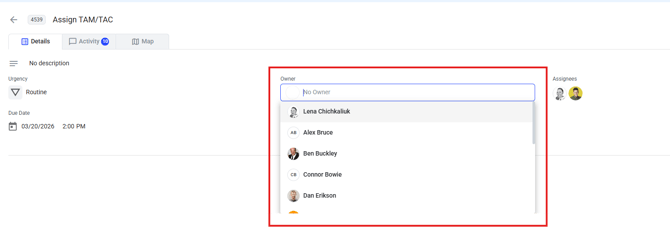
3. To remove Assignees from a task, hover over the field, click X and click Save
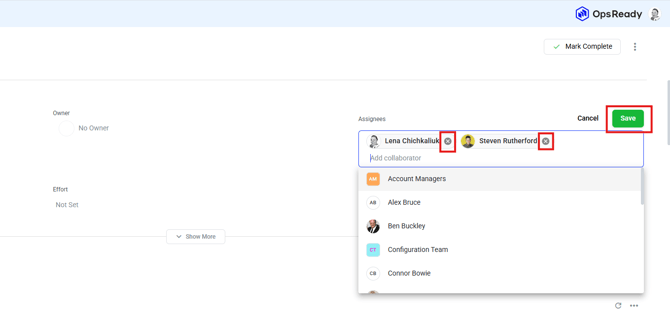
4. To remove the Owner from a task, hover over the field and click X